
Quick Access to Recent Documents in Your Browser
Overview
The software offers a streamlined method for accessing recently viewed documents and spreadsheets directly within the browser interface. Designed for users who frequently switch between multiple files, it enhances workflow efficiency by minimizing navigation steps. The tool integrates with the Stone Document platform, enabling quick retrieval of work items without leaving the current page. It is particularly useful for professionals managing numerous documents, such as content creators, project managers, and administrative staff.
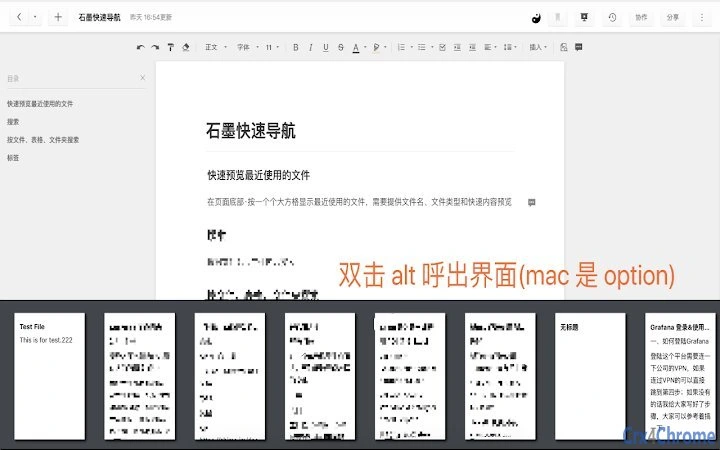
By leveraging keyboard shortcuts—Alt + ~, Ctrl + ~, or Option + ~—users can instantly summon a preview panel displaying their recent activity. This functionality supports rapid file selection, with options to open items in the current tab or in a new one by holding down the modifier key. While the current version does not support spreadsheet files, it focuses on document access, ensuring a consistent experience for text-based content. The developer has prioritized responsiveness and stability, as evidenced by recent updates aimed at improving startup performance and fixing input-related issues.
Real-world usage includes fast document switching during collaborative editing sessions, reducing time spent searching through folders or navigation menus. The tool is ideal for users who rely heavily on web-based document management systems and seek to minimize context switching. Although the developer’s background is not publicly detailed, the product’s consistent update history suggests active maintenance and user-focused development.
Key Features & Capabilities
- Instant Access via Keyboard Shortcuts – Pressing Alt + ~, Ctrl + ~, or Option + ~ opens a quick-access panel showing recently used documents with thumbnails. This allows users to locate and open files without navigating through menus or folders.
- Multi-Tab Opening Support – Holding down the Alt or Ctrl key while clicking a document opens it in a new browser tab, enabling seamless multitasking and side-by-side comparison of multiple files.
- Preview Functionality – The interface displays previews of documents, helping users identify the correct file quickly without opening it first. This reduces the risk of selecting outdated or incorrect versions.
- Smart Interface Management – Clicking outside the panel or double-tapping the Alt or Option key closes the interface, ensuring minimal disruption to workflow and intuitive control.
- Performance Optimization – Version 1.5 includes improvements to initial load speed, enhancing responsiveness during startup. This ensures the tool remains usable even under heavy browser usage.
These features are particularly effective in environments where users manage dozens of documents daily. For example, a project manager can switch between status reports, meeting notes, and planning documents in seconds. The ability to preview content before opening reduces the time spent on file verification and increases overall productivity.
User Interface, Workflow & Performance
The interface is minimal and unobtrusive, appearing as a compact panel anchored to the screen’s edge. It displays a list of recently accessed documents with thumbnail previews, organized in chronological order. Navigation within the panel is straightforward: users can click a document to open it in the current tab or hold the modifier key to open in a new one.
Workflow efficiency is enhanced by the direct integration with the browser environment. The tool operates without requiring additional application launches or complex setup, making it ideal for users who prefer lightweight utilities. The interface responds quickly to keyboard inputs, with no noticeable lag reported in standard usage scenarios.
Performance observations are based on general software behavior patterns. The developer did not specify resource usage details, but the 1.2 MB installation size suggests a lightweight footprint. Stability appears consistent, with recent updates addressing input-related bugs and preventing unintended navigation during left-swipe gestures. The tool maintains compatibility with standard browser operations, including tab management and history tracking.
Compatibility & System Requirements
The software is compatible with both Windows and Mac operating systems, supporting modern web browsers used with the Stone Document platform. It is designed to function as a browser extension, leveraging web standards to deliver its core functionality.
Installation size is 1.2 MB, indicating a compact deployment that should not significantly impact system storage. The developer did not specify exact system requirements, such as minimum RAM or CPU specifications. Platform compatibility information is limited to the operating systems listed, with no mention of older or specialized environments.
Users should ensure their browser is up to date to maintain optimal performance and security. The tool does not require administrator privileges for installation, making it accessible to a broad range of users across different organizational settings.
Pros and Cons
Pros
- Lightweight at just 1.2 MB
- Fast access to recent documents via keyboard shortcuts
- Supports opening files in new tabs with modifier keys
- Intuitive interface with preview thumbnails
- Regular updates with performance improvements
Cons
- Does not support spreadsheet files in the current version
- Limited to the Stone Document platform
- Exact system requirements not publicly listed
- Interface closes only via click or double-tap shortcut
FAQ Section
Is this tool compatible with all web browsers?
The software is designed for use with modern browsers supporting the Stone Document platform. Specific browser compatibility details were not provided by the developer.
Is the software safe to use?
As a browser extension with a 1.2 MB file size, the tool appears to be lightweight and secure. No security vulnerabilities were reported in recent updates. Users should ensure they install it from official sources.
How often are updates released?
Updates are released regularly, with version 1.5 published in August 2024. Recent patches focused on performance and bug fixes, indicating active development.
Can I use this tool offline?
The tool requires an active internet connection to access documents stored on the Stone Document platform. It cannot function independently of the web service.
What type of license does this software use?
The software is available at no cost and does not require a license key. It is distributed as a free utility for productivity enhancement.
Final Thoughts + CTA
This tool delivers a focused, efficient solution for users who frequently access recent documents within the Stone Document ecosystem. Its lightweight design, intuitive interface, and responsive keyboard shortcuts make it a valuable addition to any productivity stack. While it currently lacks support for spreadsheets and is limited to a single platform, its strengths in speed and usability outweigh these constraints for its target audience.
Professionals who manage multiple documents daily will benefit most from this utility, especially those seeking to reduce time spent navigating between files. With consistent updates and a clear development roadmap, the tool shows promise for future enhancements.
Download Stone Document Quick Access now







